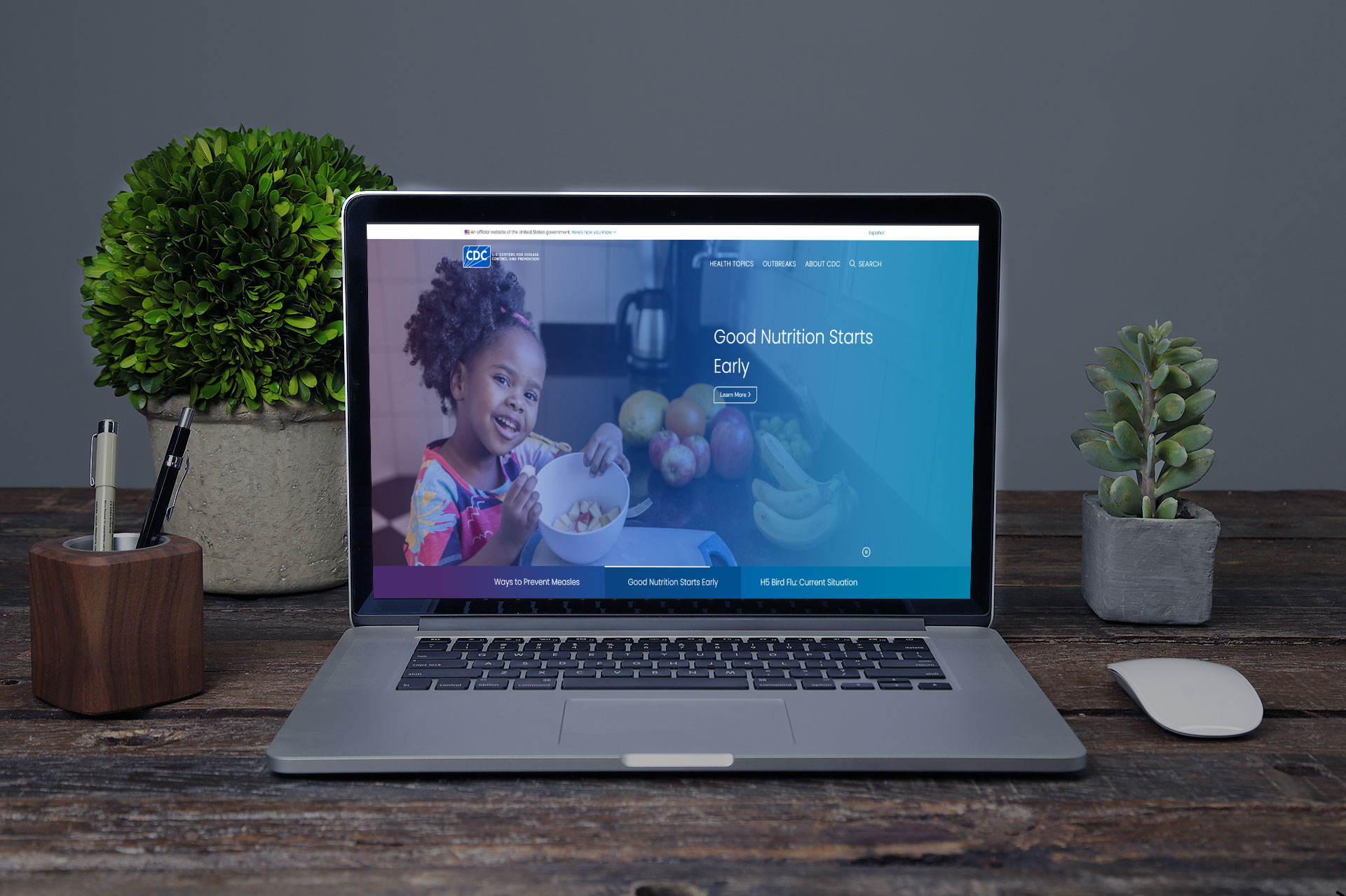
CDC desktop website screenshot

CDC

Bridging public health and design to inform, educate, and empower millions.

View Live Site

My Role

  • Lead Designer
  • UI/UX Designer
  • Front‑End Developer
  • Project Manager
  • Product Designer

Challenge

Unify and simplify the CDC’s sprawling content ecosystem—over 25,000 topic pages, interactive data dashboards, and multilingual resources—into a single, fully responsive, and WCAG-compliant platform. We needed to overhaul the information architecture, design intuitive data visualizations for evolving health metrics, and streamline critical guidance so professionals and the general public could find life-saving information in under three clicks

Key Metrics

  • Accessibility Compliance:WCAG 2.1 AA 100 %
  • Page Load Time:↓ 50% (from ~4 s to ~2 s)
  • Mobile Traffic Share:↑ 55%
  • Average Time-on-Page: ↑ 45%
  • Data-Viz Interaction Rate:↑ 60%
  • User Satisfaction (post-launch survey):4.8/5

Responsibilities & Resolutions

I served as the lead UI/UX Designer and Front-End Developer on a large cross-functional team tasked with redesigning the Centers for Disease Control and Prevention (CDC) website. The agency aimed to give their digital presence a refreshed, modern look while also creating a more intuitive, forward-thinking navigational structure to better serve users seeking timely health information.

I was responsible for leading the design and development of the site from the legacy system to a fully reimagined experience hosted on WordPress. This included stakeholder interviews and content gathering, followed by wireframing, mockup design, and interactive prototyping to test and validate concepts with users and internal teams. I ensured that every stage of the process stayed within project scope and budget, and that deliverables were timely and aligned with both user needs and organizational goals.

A key part of my role involved conducting a full content and analytics audit of the legacy CDC website to understand user behavior, identify high-traffic pages, and surface the most sought-after information. This helped guide decisions about content hierarchy, IA restructuring, and homepage prioritization.

Rebranding Contributions:

  • Enhancing Findability and User Flow: Developed a streamlined, one-to-two-click navigation model to minimize friction and reduce user frustration. Clear pathways were created to guide users quickly to critical health alerts, data dashboards, and resources..
  • Modernizing Visual Design: Improved the visual branding of the site through refreshed graphic elements, modern typography, iconography, and a clean, accessible layout that aligned with the CDC’s reputation for authority and clarity.
  • Improving Accessibility: Ensured full compliance with Section 508 standards, making the site usable for all audiences, including users with disabilities.
  • SEO & Metadata Optimization: Strengthened the site’s SEO by implementing clear meta descriptions, accessible markup, keyword-rich titles, and schema best practices to increase visibility across all search engines.
  • UX-Driven Product Research: Conducted competitor analysis and industry benchmarking to understand how best to showcase CDC's wide range of tools, resources, and reports. Designed flexible content modules for presenting evolving information, especially during time-sensitive events like health outbreaks.
  • Data-Informed Design Decisions: Used legacy site analytics to determine top-performing content and user drop-off points, which directly informed page structure and prioritization.

CDC website on laptop
Brand workshop & wireframe sketches
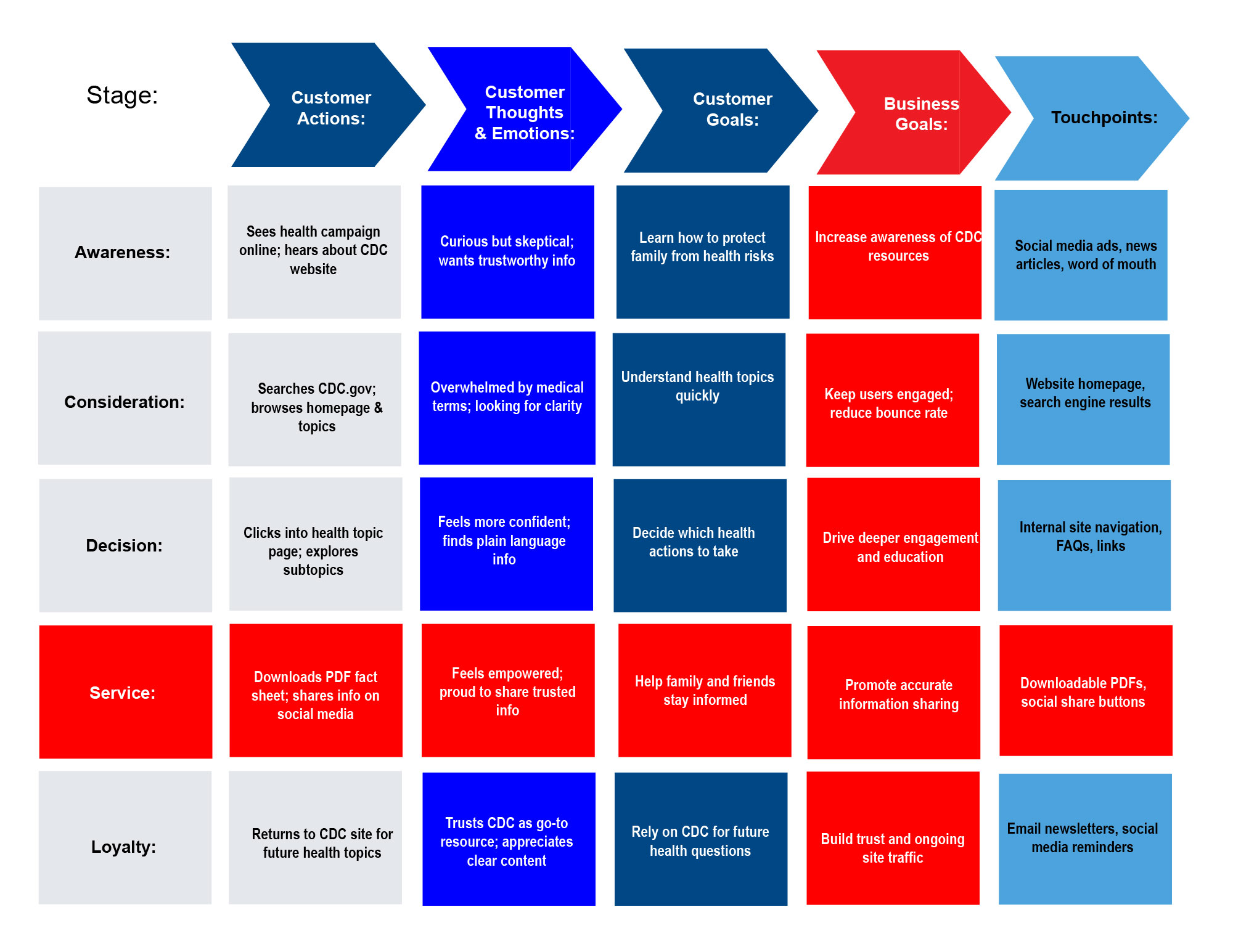
CDC Journey Map
CDC Journey Map

Research, Planning & Design

In the initial Research, Planning, and Design phase of the CDC’s complete website overhaul, my focus was on creating a forward-looking, user-centered experience that emphasized ease of access to vital public health information. The CDC aimed not only to refresh the look and feel of the site, but also to reimagine its navigational structure with a more modern, intuitive interface that prioritized critical content and minimized user friction.

From the start, I maintained ongoing collaboration with executive stakeholders, ensuring that project goals, user needs, and technical requirements were aligned. We held weekly strategy sessions to identify and address pain points from the legacy website, such as information overload, unclear paths to key data, and poor mobile usability. These meetings allowed us to adapt the product roadmap in real time and ensure transparency in the development lifecycle

  • User Behavior & Content Analysis: Conducted deep research into how users interacted with the legacy CDC website using analytics tools, heatmaps, and session replays. Identified common drop-off points, underutilized content, and pathways users took to access high-priority information (e.g., outbreak updates, vaccination guidance, health stats).
  • Information Architecture Restructure: Used findings to inform a streamlined IA that reduced clicks and cognitive load, leading to a one-to-two-click access model for key user journeys. Ensured that vital public health content appeared prominently and was organized by task and audience type.
  • SEO Research & Optimization: Audited existing metadata and keyword usage across the legacy site. Implemented updated SEO strategies, including optimized meta tags, semantic structure, and keyword-rich page descriptions to boost search engine visibility and improve organic reach.
  • E-Commerce & Resource Flow: While the CDC does not sell traditional products, it offers tools, PDFs, datasets, and guidance that function similarly. I researched digital product layout patterns to improve presentation and accessibility of these resources, focusing on hierarchy, download clarity, and contextual linking.
  • Design System Foundation: Began wireframing and prototyping using a modular design system, ensuring scalability and visual consistency across CDC subpages and microsites. Designs were built with accessibility at the forefront, fully aligning with Section 508 compliance and WCAG guidelines.
  • Search Experience Enhancement: Improved search experience by integrating advanced filtering, predictive search suggestions, and topic-based content grouping—allowing users to locate critical information quickly and efficiently.

Navigation Through the Eyes of the User

As part of the CDC’s effort to modernize its digital presence, a core challenge was rethinking how users accessed critical health information across a vast ecosystem of content. Through extensive research, usability testing, and behavior analysis, I identified several friction points that were preventing users from finding what they needed—and, equally important, overlooking content that was vital to their health and safety.

Key findings revealed that users were struggling to locate high-value content, such as CDC guidance documents, data dashboards, and downloadable PDFs. Many of these resources were either buried under unclear navigation layers or labeled in ways that didn’t resonate with real-world user intent. The legacy menu structure also lacked accessibility compliance, making it difficult to navigate for users with disabilities.

These insights directly shaped my strategy to reimagine the CDC’s navigation model through a user-first, accessibility-driven lens.

Key Solutions Implemented:

  • Flowchart & Journey Mapping: Created detailed flowcharts and user journey maps to visualize how different audiences—general public, healthcare professionals, researchers—approached the site. This helped guide the structure of navigation and content placement.
  • Accessible, Future-Forward Menu System: Designed and implemented a fully 508-compliant, streamlined mega menu that was both keyboard-navigable and screen-reader friendly. Categories were labeled with plain-language terminology based on user research, improving clarity and comprehension.
  • Prioritization of High-Value Content: Ensured that critical links, reports, and documents were surfaced through contextual CTAs and prominent homepage placements. Key health alerts and frequently accessed tools were given visual prominence and linked from multiple entry points.
  • Simplified Content Discovery: Introduced a clear, topic-based hierarchy and added filters and contextual navigation panels to reduce click paths and eliminate dead ends. Content was grouped by user needs and intent rather than internal taxonomy.
  • Improved Navigation Flow: Implemented same-window navigation where appropriate to maintain continuity and make browser navigation (i.e., back button) more intuitive for users.
  • Breadcrumbs & Wayfinding Enhancements: Developed a breadcrumb system to provide users with clear orientation and allow for fast navigation back to previous sections, especially within dense content areas.

Graphic of site construction and user navigation
User flow & sitemap diagram
Illustration of roadblocks and solutions
Overcoming stakeholder and budget hurdles

Challenges & Hurdles

Redesigning the CDC’s website to deliver a modern, intuitive, and user-first experience came with its share of complex challenges—both technical and organizational. While the vision was clear—create a forward-thinking, accessible platform that made public health data easier to find and understand—executing that vision required navigating a number of internal and external hurdles.

One of the most significant challenges stemmed from cross-departmental politics and resistance to change. With multiple teams involved and differing priorities across divisions, alignment around design decisions, content ownership, and platform goals was often difficult to maintain. Some stakeholders were hesitant to let go of legacy systems and traditional structures, which slowed progress and introduced friction into the workflow.

In addition to team dynamics, budget constraints limited access to certain tools, testing platforms, and additional development resources that could have streamlined or enhanced the rebrand process. These limitations required a high level of creativity, adaptability, and prioritization in order to stay on track.

Another major issue was content scarcity—gathering accurate, updated, and user-friendly content from various departments proved to be a challenge. The CDC's vast amount of information often existed in silos, and coordinating updates across content owners required persistent communication and careful documentation.

Key Challenges Faced:

  • Funding Limitations: Restricted access to advanced UI testing tools, design systems, and third-party integrations that could have accelerated implementation and testing.
  • Content Gaps: Inconsistent or outdated content slowed progress, particularly when redesigning high-traffic pages or critical health guidance sections. Many assets required rewriting or reformatting for clarity and accessibility.
  • Communication Barriers: With multiple stakeholders, including public affairs, research divisions, and technical teams, it was often difficult to maintain a unified direction. Misalignment led to scope changes, approval delays, and shifting priorities.

Testing & Quality Assurance

As part of the CDC’s initiative to modernize its digital presence and create a more futuristic, user-friendly website experience, a comprehensive testing and QA process was a critical phase of the redesign. The goal was to ensure that the newly designed site was not only visually consistent and intuitive across devices, but also functionally reliable, secure, and accessible to all users—including those relying on assistive technologies.

We conducted unbiased user testing with participants who were instructed to interact with the site naturally—without guidance or predefined tasks. This approach gave us valuable insight into real user behavior, allowing us to identify pain points in navigation, layout inconsistencies, or areas where users hesitated or became confused.

The CDC site was tested across a broad range of devices, screen sizes, and browsers to ensure responsiveness and visual consistency, especially considering the diverse audiences that rely on the CDC's information. Testing also extended to critical downloadable resources and interactive tools, ensuring accessibility and functionality were preserved.

Testing Objectives:

  • Cross-Device & Cross-Browser Compatibility: Verified that the site maintained a consistent look, feel, and functionality across desktop, tablet, and mobile devices, as well as all major browsers (Chrome, Firefox, Safari, Edge). Ensured seamless transitions from one device to another, particularly important for users referencing the site on the go during public health emergencies.
  • Responsiveness Validation: Evaluated how well the site adapted to various screen resolutions and input methods. Ensured that menus, infographics, and documentation remained legible and easy to use, regardless of platform.
  • Accessibility & 508 Compliance Testing: Conducted manual and automated checks to confirm that screen reader compatibility, keyboard navigation, alt text, contrast ratios, and semantic HTML were all in compliance with Section 508 and WCAG standards.
  • Search Optimization Insights: Monitored how users interacted with the internal search and indexed content. This helped us identify opportunities to improve visibility of key content and boost search efficiency through improved metadata and keyword structuring.
  • Security & Data Protection Considerations: Though the CDC site doesn’t handle traditional product purchases, we ensured secure delivery of downloadable documents, data dashboards, and interactive features. Collaborated with backend teams to explore methods of strengthening data privacy, site integrity, and protection from external threats.

Multidevice QA & usability tests