
Visual direction, slide architecture, hierarchy, data treatment, reusable layouts, refinement, and final presentation QA.
Presentation Design · Growth Marketing · Information Design · Visual Systems
Turning Aretum’s 2025 growth strategy into a presentation leaders could scan, discuss, and act on.
I translated a dense mix of growth targets, cross-functional responsibilities, acquisition workflows, and planning content into a 22-slide internal strategy-session experience built for clarity and facilitation.
My Aretum role crossed growth marketing, web, and contract proposal work. For this deck, I applied that cross-functional perspective to narrative structure, information hierarchy, data visualization, reusable slide patterns, and presentation QA.

22 slides
2025 growth focus
Cross-functional alignment
Project overview
I treated the deck as an internal product: a repeatable interface for strategic conversation.
The source material included 2025 revenue and pipeline targets, role definitions for sector, BD/capture, solutions, proposals, and contracts teams, plus business-acquisition lifecycle content. The design needed to make that complexity navigable in a live working session.
Growth marketing with connected web and proposal responsibilities, giving the work both communication and capture-oriented context.
Executives, growth leaders, sector leads, BD/capture, solutions, proposal, and contracts stakeholders.
A facilitation-ready strategy deck that makes targets, ownership, workflows, and next steps easier to understand together.
What needed to change
Strategic content only works when the audience can find the signal before the discussion moves on.
I reduced reading friction by creating clear entry points, consistent slide behaviors, and visual patterns that let people recognize the type of information before reading every word.
Separate priorities from supporting detail
Targets, role ownership, lifecycle stages, and action items received distinct visual treatments so the discussion had a clear hierarchy.
Turn slides into a guided decision path
The narrative moves from purpose and targets into responsibilities, collaboration, acquisition process, incentives, and execution.
Design for the room, not just the file
Large headings, concise groupings, strong contrast, and repeatable structures support scanning, presenting, and discussion at presentation distance.
Process + project management
I connected content strategy, visual design, and production decisions instead of treating them as separate handoffs.
The workflow focused first on the information model, then on reusable presentation patterns, then on refinement and delivery.
- 01
Inventory + prioritize
Identify the strategic questions, target metrics, team responsibilities, lifecycle content, and decision points that needed visual emphasis.
- 02
Architect the story
Group content into a deliberate sequence: purpose → targets → roles → collaboration → acquisition process → execution.
- 03
Build the system
Create repeatable title, section, role, data, process, and callout patterns so new content could enter without redesigning every slide.
- 04
Review + preflight
Refine density, alignment, hierarchy, image treatment, legibility, slide-to-slide consistency, and final presentation behavior.
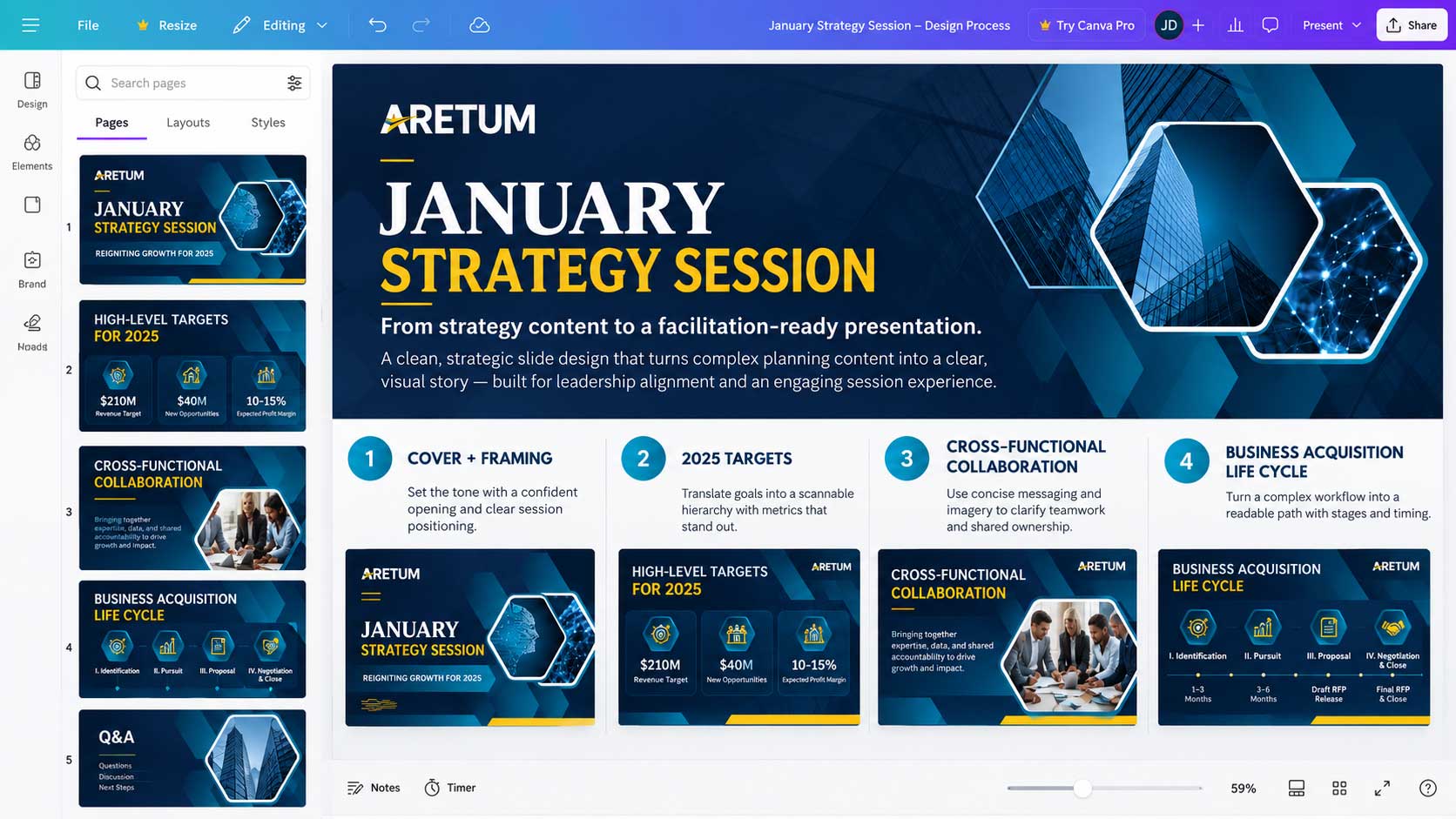
Design-system thinking
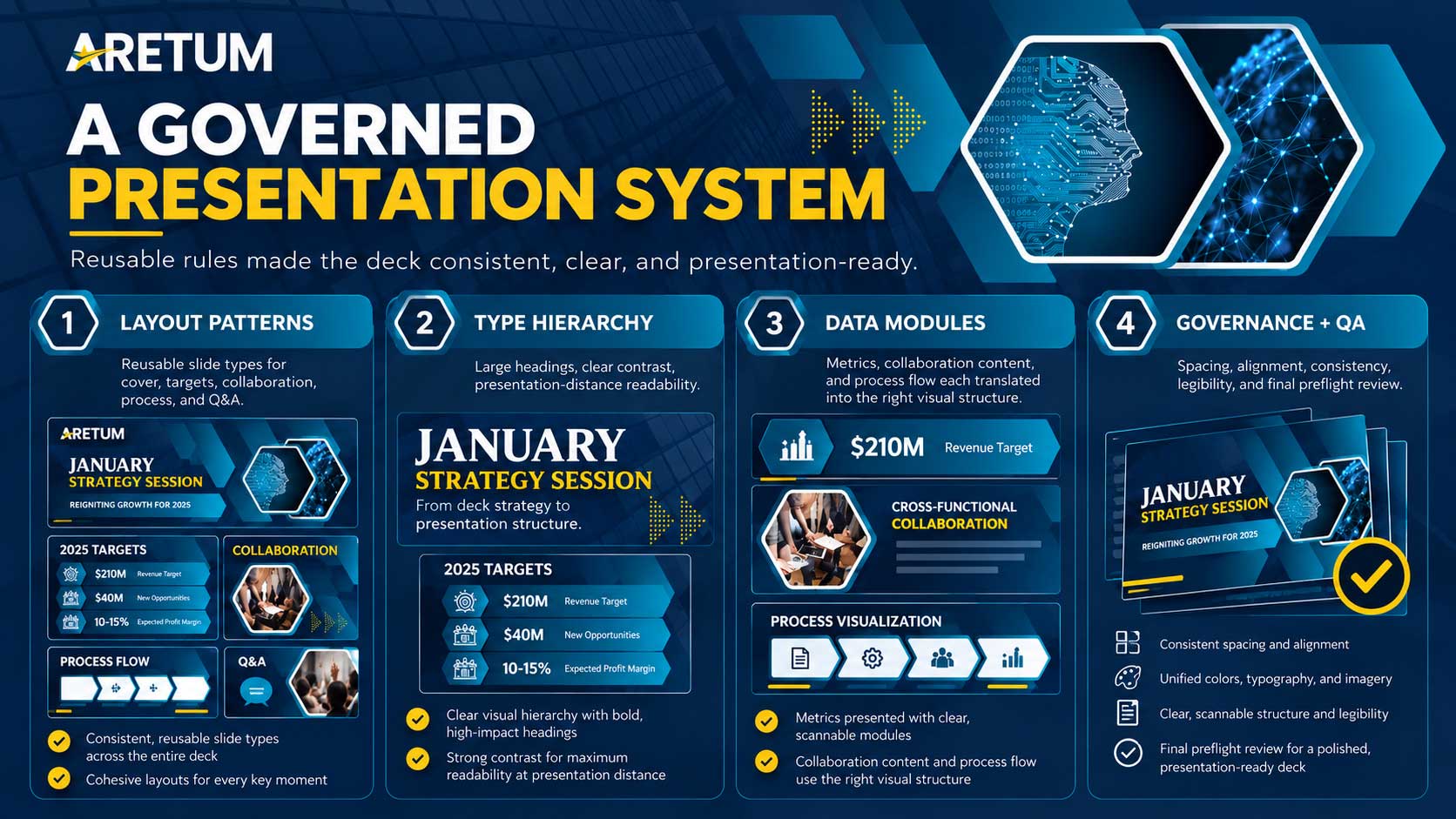
I built a governed presentation system—not a collection of one-off slides.
This is not an enterprise product design system, but the operating principles are directly transferable: reusable components, defined hierarchy, consistent tokens, pattern reuse, and quality controls that make a large artifact easier to scale and maintain.
Recruiter critique addressed:
The case study now makes the system layer visible—how repeatable rules, components, and governance supported consistency across a 22-slide communication product.
Layout patterns
Reusable slide types for sections, roles, targets, workflows, and action-oriented content.
Type hierarchy
Predictable headline, subhead, label, body, and data roles create fast visual parsing across the deck.
Data modules
Targets, percentages, lifecycle stages, and comparisons use consistent emphasis rather than ad-hoc formatting.
Governance + QA
Alignment, spacing, color, asset handling, legibility, and slide behavior are checked as system-level rules.



Data visualization + information design
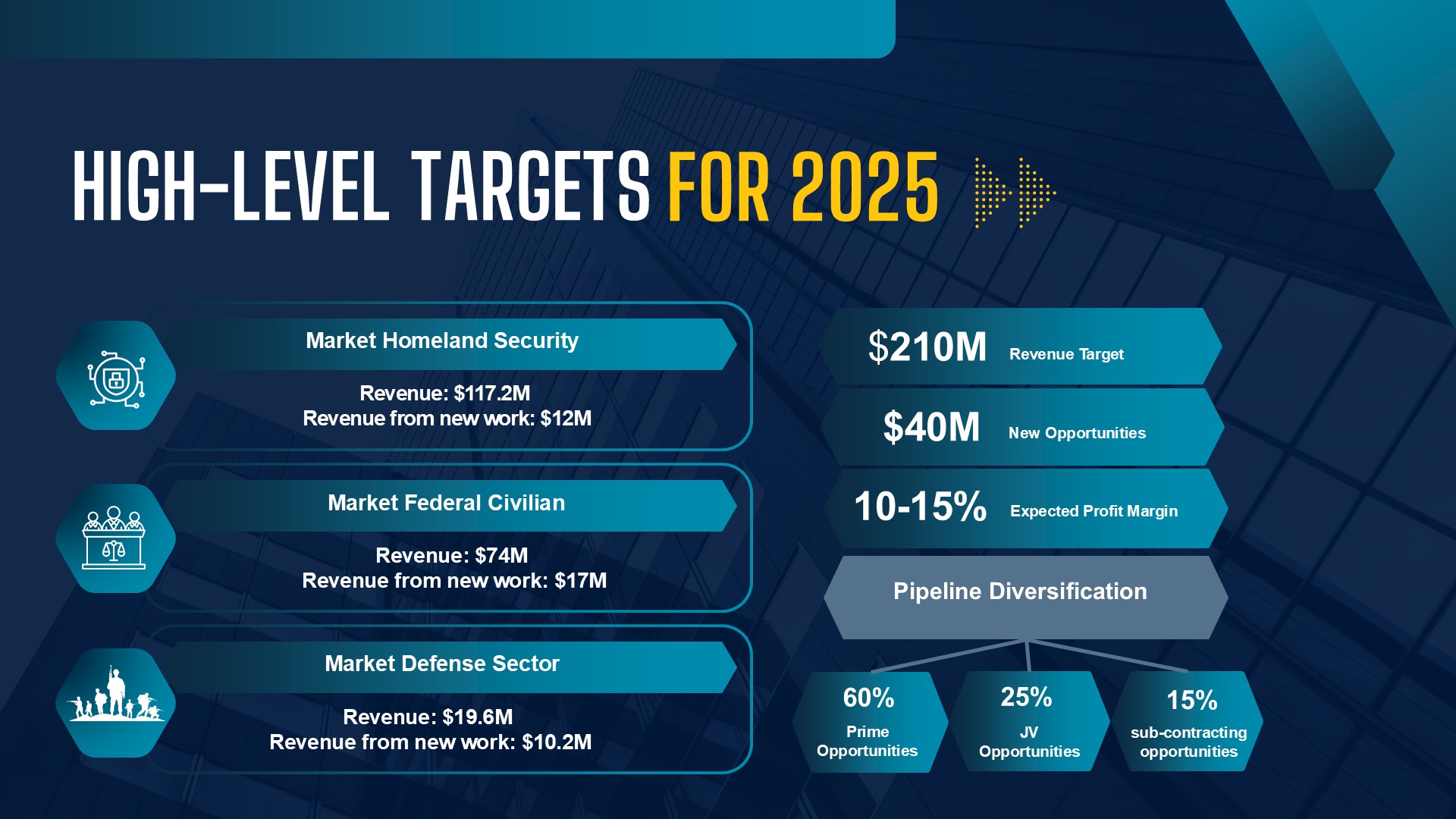
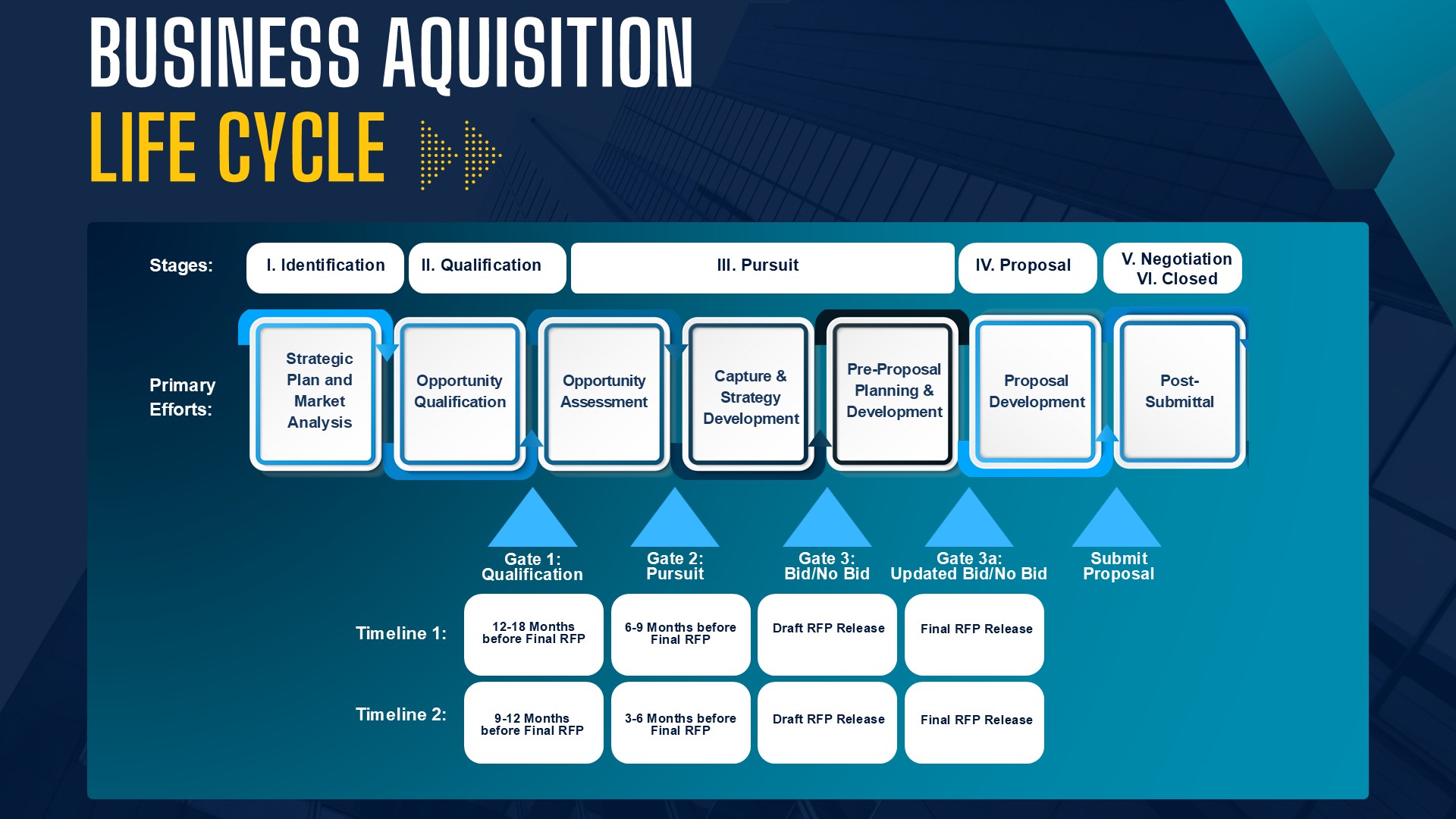
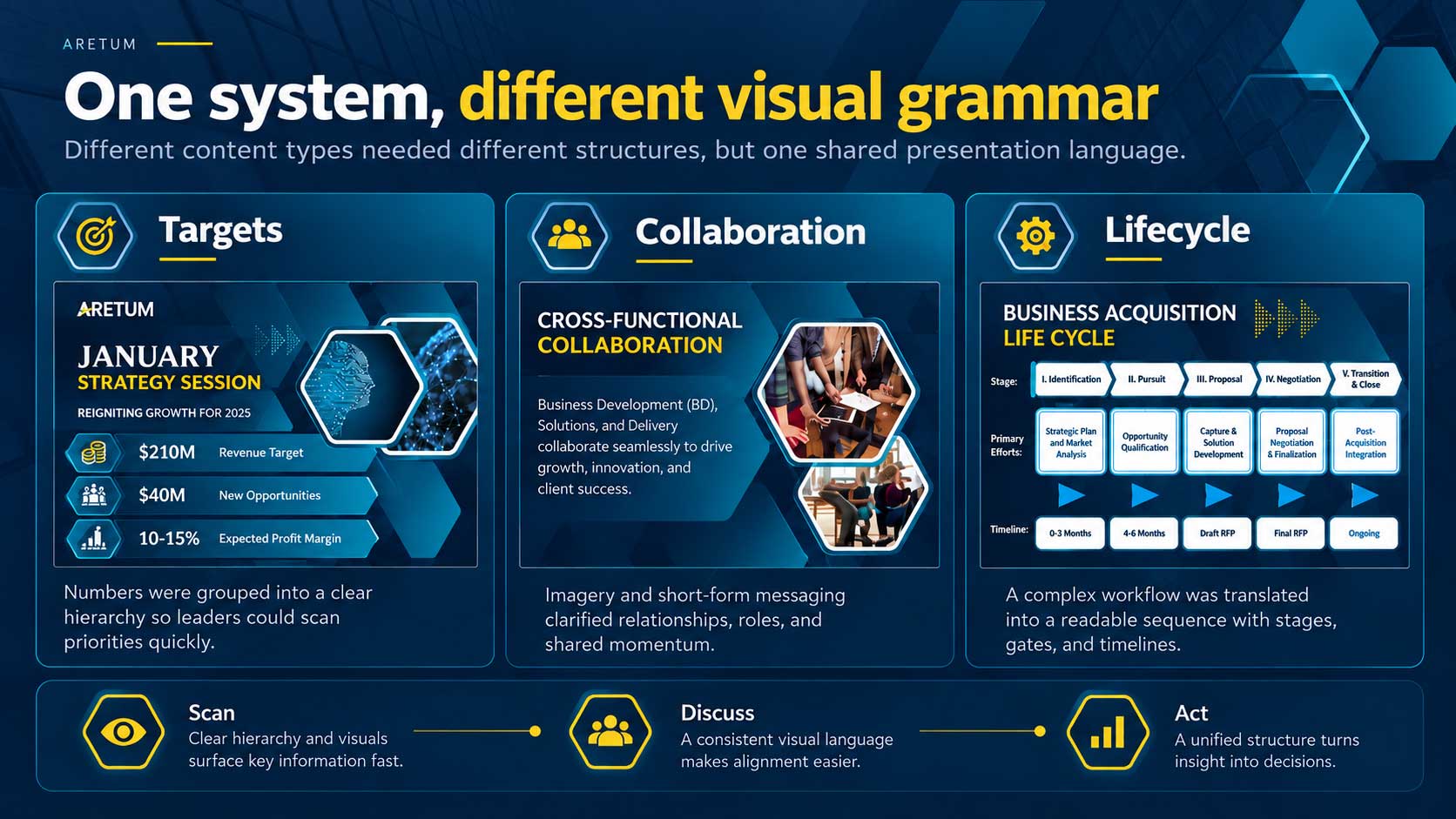
Numbers, ownership, and lifecycle stages needed different visual grammar—but one shared system.
Rather than decorate the content, I used hierarchy to reveal what each slide was asking the audience to understand: a target, a responsibility, a relationship, or a sequence.
- Targets: use scale and contrast to make revenue, margin, and pipeline goals immediately scannable.
- Roles: use repeated structures to make cross-functional responsibilities easier to compare.
- Process: use directional flow and milestones to turn acquisition stages into a navigable journey.
- Facilitation: preserve enough white space and pacing for discussion rather than filling every slide.
Interactive deliverable
View the presentation in PowerPoint Show mode.
The portfolio page tells the design story; the PPSX lets reviewers experience the actual presentation artifact and motion behavior as a presentation.
Browser behavior varies. The PowerPoint Show may open in desktop PowerPoint or download for local viewing.
End goal + accomplishment
The finished deck turned a dense operating discussion into a structured visual working session.
Faster orientation
Clear section architecture and repeatable slide patterns help audiences recognize context before reading the details.
Shared language
Roles, targets, and lifecycle stages are presented in comparable formats that support cross-functional discussion.
Reusable foundation
The system can absorb future strategy-session content without rebuilding the visual language from zero.
Design value